On this page
AI invoice processing works best when automation handles the routine work and intelligence explains everything that needs a human decision.
Finance teams have been automating parts of accounts payable for years. Yet many still spend their days keying invoice data, chasing coding questions and checking for duplicates. The problem is not a lack of tools. It is that traditional automation moves data quickly but does not understand when something is wrong, and it rarely explains why.
EVA, the Enterprise Value Accelerator, is StrategyStack’s flagship enterprise AI platform. Its first workflow for finance teams is AP automation: invoices are processed automatically, and anything that fails a check is stopped, explained and routed to the right reviewer. This article walks through how EVA brings automation and intelligence together, step by step.
Automation vs. intelligence in AI invoice processing
It helps to separate the two ideas:
- Automation does the repetitive work: picking up invoices, reading fields, applying rules and moving approved invoices into the ERP.
- Intelligence decides what needs attention: spotting exceptions, explaining the reason and making sure the right person sees it.
Automation without intelligence passes errors through faster. Intelligence without automation creates more alerts for people to handle. EVA combines both, with people in control of every decision.
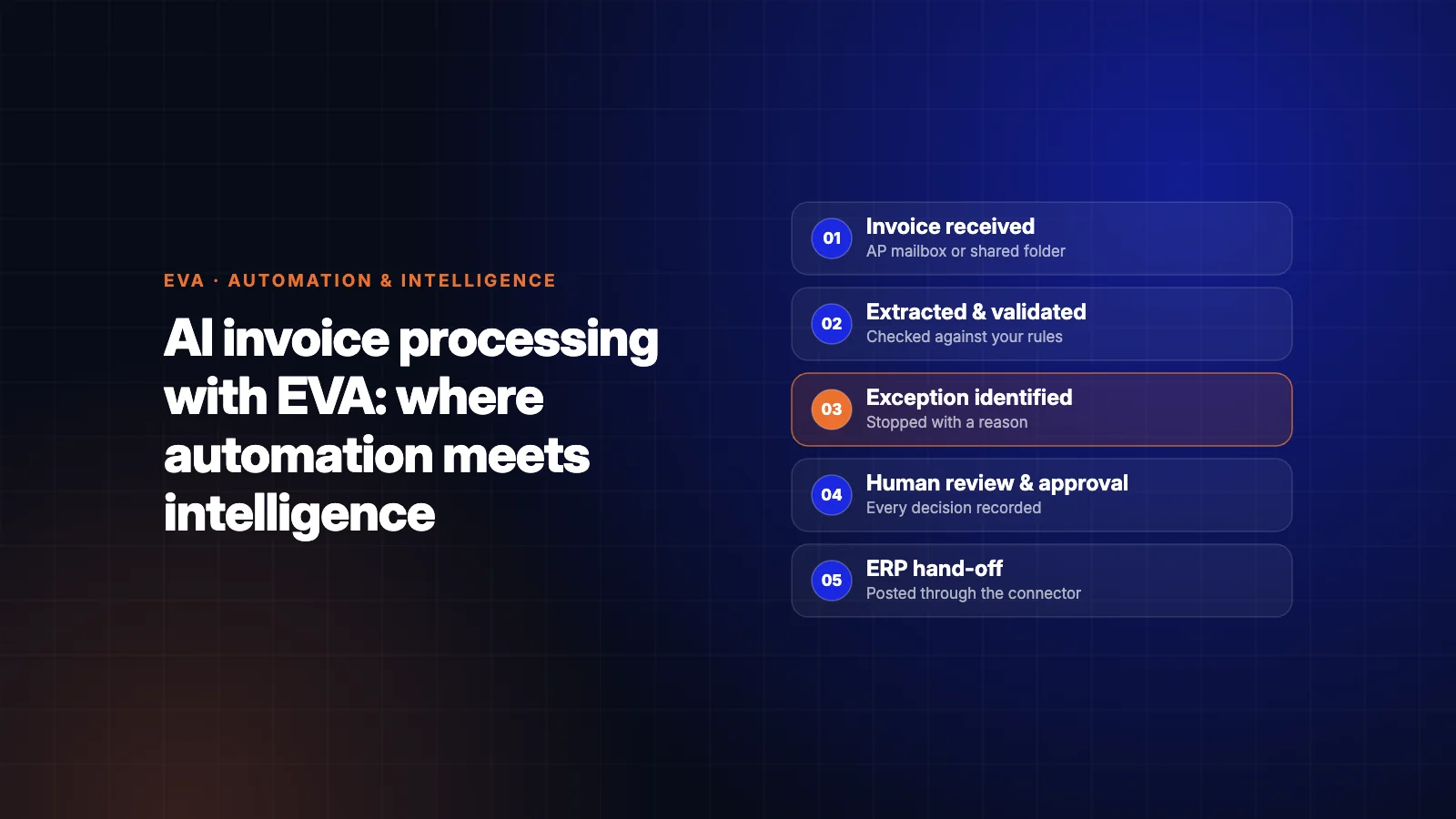
The 5 steps of AI invoice processing with EVA
1. Invoice received
Invoices arrive the way suppliers already send them. EVA AP Automation watches a dedicated Microsoft 365 AP mailbox and any shared folders a business connects. Suppliers do not need to change anything, and every message and file is recorded once so nothing is processed twice. PDF, image and common office formats are supported.
2. Data extracted and validated
EVA reads the invoice fields, then checks them against the organization’s own rules, such as vendor details, GL coding rules and duplicate checks. Every invoice has a status and a history.
3. Exception identified
This is where intelligence matters most. When an invoice fails a check, EVA stops it with a reason instead of guessing. For example, if a line item does not match a GL coding rule for that vendor, the invoice is held and the reason is shown in plain language.
4. Human review and approval
Exceptions are routed to the right reviewer, and approvals follow the approval workflow the business already uses. People decide to approve, hold or reject, and every decision is recorded, creating a clear audit trail.
5. ERP hand-off
Approved invoices post to the ERP through a connector, so the same AP automation can work with different finance systems:
- Microsoft Dynamics GP: available.
- Oracle NetSuite: available, with the exact posting scope agreed in discovery.
- SAP (S/4HANA, ECC, Business One): delivered as a connector project once the version, access method and data scope are confirmed.
- Other ERPs: systems with a documented API can be assessed case by case.
Why AI invoice processing needs people in control
Finance leaders are right to be cautious about AI making decisions on spend. EVA is designed so that:
- Routine invoices that pass every check move quickly, reducing manual effort.
- Anything unusual is stopped and explained, not silently processed.
- Authorized people approve what matters, and every action is recorded.
The result is faster processing and better visibility without giving up control.
Beyond accounts payable
AP automation is EVA’s first finance workflow, not its only one. EVA connects enterprise intelligence, AI-powered decision making and intelligent execution around business goals. In finance, that already includes workflows such as retail sales reconciliation run overnight and ready for the team to review. The same pattern of goal, context, intelligence, automation and human oversight extends to other enterprise workflows over time.
Getting started safely
EVA is introduced in a controlled way:
- Your IT team approves mailbox and ERP access.
- EVA is tested in a test or sandbox company first.
- The switch to production happens after acceptance.
Mailbox access uses a standard Microsoft 365 app registration that your IT administrator approves, and EVA reads only the mailbox you name.
Key questions for finance leaders
- How much of your AP team’s time goes into keying data and chasing exceptions?
- Can you see, today, why each invoice is on hold and who is working on it?
- How quickly could your auditors trace an approval decision?
If these are hard to answer, AI invoice processing is a practical place to start with enterprise AI.
See EVA in action
EVA is part of StrategyStack’s connected approach to AI and the intelligent enterprise, alongside Finance Transformation and managed services. To see how EVA processes invoices and manages exceptions, explore EVA or talk to our team.